Bring your photos to life.
A Windows app that turns a still image into a short AI-generated video — running entirely on your own computer. No cloud uploads. No per-second fees. Just you, your photos, and your GPU.
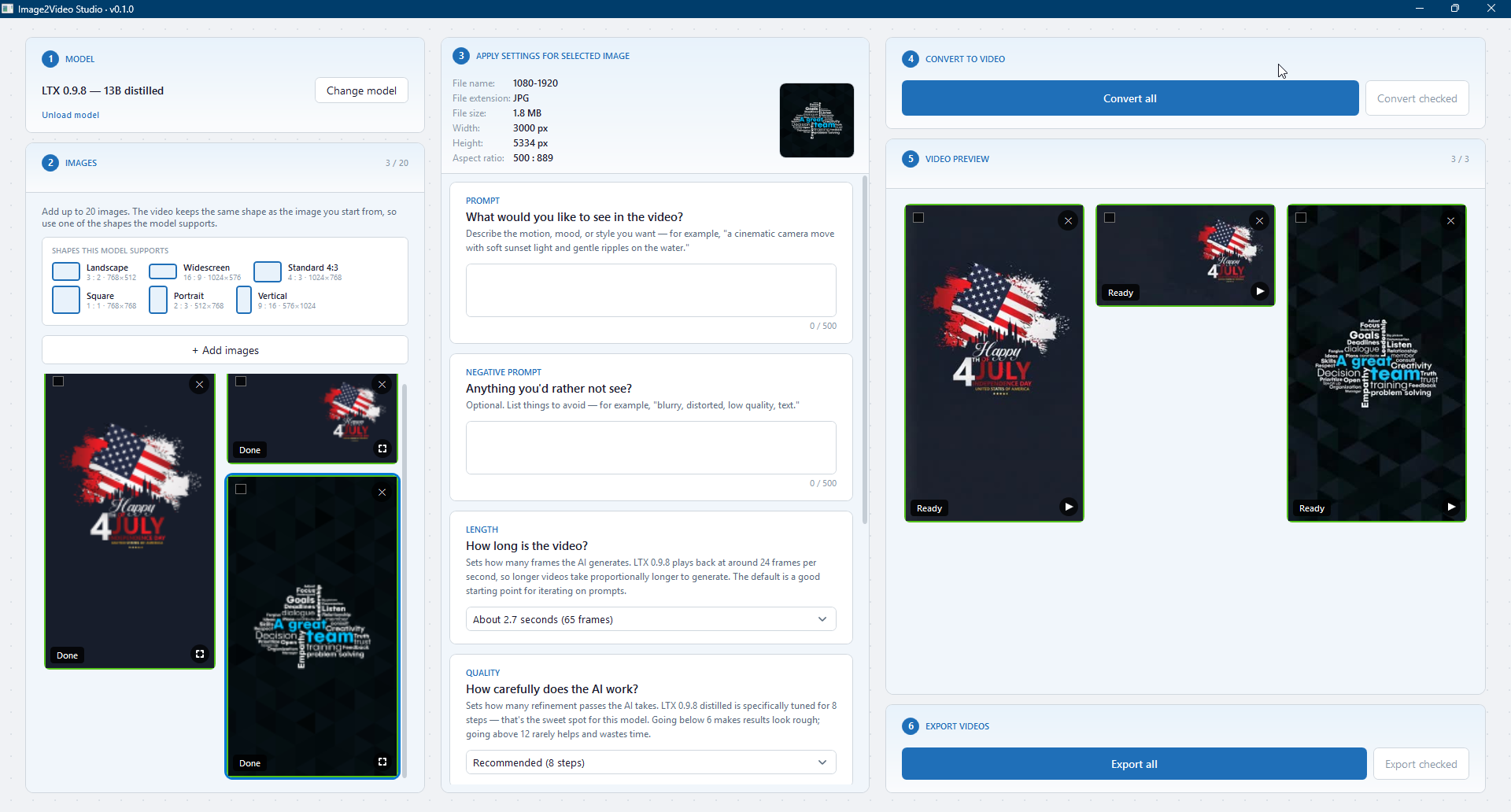
The Image2Video Studio workspace — pick your photos on the left, describe the motion in the centre, watch your videos appear on the right. Everything happens on your own GPU.
Most AI tools are cloud services.
We built something different.
Image2Video Studio is software you install — not a service you rent. That changes everything about what's possible, what's private, and what you pay.
Runs on your computer
Everything happens locally on your GPU. Your photos, your descriptions, your videos — none of it touches our servers. Generation works fully offline once the app is installed.
Curated, not open-ended
We hand-pick the best open AI video models and bring them into one tidy app. You don't need to know which model is best — we already did the work. Just press Generate.
Provenance built in
Every video is signed with C2PA Content Credentials so anyone can verify how it was made. We believe AI content should be honest about being AI.
From a photo to a finished clip in three steps.
No timeline, no keyframes, no rendering queues. The hard part is choosing which photo to bring to life first.
Open a photo
JPG or PNG. Any subject — people, places, products, art. You keep the original; nothing is modified.
Describe the motion
A short sentence about what should happen — or leave it blank and let the app pick a sensible default.
Press Generate
A short video appears in a few minutes, right on your computer. Preview it, then export as MP4.
The difference is everything.
Cloud AI tools optimise for their margins. Local software optimises for you.
What you get
- Unlimited generations — your subscription is yearly, not per-second
- Your photos stay on your computer, always
- Works offline once installed
- Predictable cost — $144 a year, full stop
- C2PA Content Credentials on every video
- You own the output, full commercial rights
- One-click model updates from our curated catalogue
The usual deal
- Pay per second, per credit, per generation
- Your photos uploaded to a third party
- No app — just a webpage that needs constant internet
- Subscription tiers that gate the good models
- Provenance metadata stripped or optional
- Commercial-use rights depend on which tier you pay for
- Models change without notice
Image2Video Studio is a Windows app.
Generation runs on your GPU, so a recent graphics card matters more than anything else.
Minimum
- Windows 11 (64-bit)
- NVIDIA RTX GPU with 8 GB VRAM
- 16 GB system RAM
- 100 GB free disk space
Recommended For speed
- Windows 11 (64-bit)
- NVIDIA RTX GPU with 12+ GB VRAM
- 32 GB system RAM
- NVMe SSD with 200 GB free